Recently in Computer Category
August 21, 2013
openSUSE 12.3
Here is a random recommendation for openSUSE 12.3. It seems that, while we were all busy moaning about GNOME's recent-ish design decisions, KDE has gradually been becoming absolutely awesome. Loads of features, fast, stable and looks beautiful. Switching to openSUSE with KDE after using Fedora with LXDE (up to version 17) is like waking up from a horrible dream. There were only a tiny number of things that I needed to tweak or fight against after installation.
To whichever programmer did the extra fiddling to make things such that the assignments of the other mouse buttons, no matter how weird, are preserved when you switch between right or left-handed mode: I noticed it and appreciate your work - thank you.
Fun with linking data files
Here's a neat trick that I recently discovered, from here. Say you have a data file which is needed by your program, and you don't want to bother with installing it in /usr/share/somewhere and having to "make install" every time you want to test a tiny change. You would also prefer to edit it as a separate file, not weave it into your other source code somehow. You can achieve this by creating an object out of the file itself and linking it into your binary. The procedure is quite simple:
$ ld -r -b binary -o myfile.o myfile.txt
$ gcc myprogram.o myfile.o -o myprogram
Then, in C:
extern void *_binary_myfile_txt_start;
extern void *_binary_myfile_txt_size;

void get_data()
{
   size_t len;
   char *v;

   len = (size_t)&_binary_myfile_txt_size;
   v = malloc(len+1);
   memcpy(v, &_binary_myfile_txt_start, len);
   v[len] = '\0';
   printf("myfile.txt contains '%s'\n", v);
}
Contrary to what's implied by the original article, I don't think you can assume that the data is zero-terminated (why would it add a terminator? It's binary data as far as the linker is concerned, not text). This example code includes some extra faffing around to add the terminator.
This technique works quite nicely with automake as well. In Makefile.am, I put something like this:
src/myfile.o: src/myfile.txt
      ld -r -b binary -o src/myfile.o src/myfile.txt
LDADD += src/myfile.o
I use a single Makefile.am at the top level of my project, avoiding "recursive make" where possible, so everything is prefixed with "src/". The symbols used to find the data in the program therefore look more like this:
extern void *_binary_src_myfile_txt_start;
extern void *_binary_src_myfile_txt_end;
Disadvantages of this technique? "ld" is not the linker on all platforms supported by autotools, e.g. Mac OS X, so it's not very portable.
July 28, 2013
GPG public key
Encrypted email is welcome to any of my addresses.
Key fingerprint = 4E1F C14D 0E0A A014 FE5D 3FC6 C628 75D1 D4CA 4C30
$ gpg --keyserver keys.gnupg.net --recv-keys D4CA4C30
-----BEGIN PGP PUBLIC KEY BLOCK-----
Version: GnuPG v2.0.19 (GNU/Linux)

mQENBFHy560BCAC8cSBnm7Jc7rKbIY7yc+VzwHUmYbgzWilIaAVpFQPt+eZmrn9h
vTbuIs0OwtLqXfuLiHeSMYOUjRmTYlszFx8bc8xDWKIRVFEqnpgvwJcokFoDJOiN
tm/4Tid3U9Jd9HTQWDAl3TtR5scMHK34TX5CemTOt7cNOSHDhgDsq8CKITerPNg4
zv0jW3B5TWPJbJlm4w7Io86KQmjxSj/g0vdFKQiaKYCRYPqtcy9NgvghPldDJX+x
Edo10n76Ar9NWUFz7+Hw8asZmJSx0/13wWkjN8BjEnri612O6t3eMmCnhPEYgMet
rf0crSr8xpoaI1sT5QwrhpHiko0kkQYFXWABABEBAAG0JlRob21hcyBBLiBXaGl0
ZSA8dGhvbWFzLndoaXRlQGRlc3kuZGU+iQE5BBMBAgAjBQJR8ujZAhsDBwsJCAcD
AgEGFQgCCQoLBBYCAwECHgECF4AACgkQxih10dTKTDAlMAf/bPL64TyIOr4rTJWh
hWFkfe4lM9ZtBO0a6NdCFU0uSjPVICPnnLxvlRYYiYGuTycml2zuxsVWKnkXEBIE
bWpQJ+HsQL90Dw4Gear7bkUBUs2h4r7ksgyJlWuQp75xdPp8cVQSXn9SdMIrPgbf
MTwJG9KqvNx+BNBEizIF43×2/lVq+3yKsLjuxAVfgqTDgddGOxlOkPtixsLCBJ+P
CY6mmK8xW8EqAMYhUwGbyiEHV4yPZ/RjUXUChiMiK0FQZTKr/g9rbR0XDFcLgtN6
SiCE2ssxR6E7Qy/BIf+BubSJJm3gAcRqgUN8N4X4gBUezoTiHPQ2RPTCExLunU6e
X0YIi7QjVGhvbWFzIEEuIFdoaXRlIDx0YXdAYml0d2l6Lm9yZy51az6JATwEEwEC
ACYCGwMHCwkIBwMCAQYVCAIJCgsEFgIDAQIeAQIXgAUCUfLxtAIZAQAKCRDGKHXR
1MpMMARuB/0RZKRfOkzEMqDGgs7++iA67bw+4V/2hygjz/ociv+idjdetU7hz9jw
71LCoFvGMTnKau2KWjTlEBHtU95JFGI5VR8HwF8Titqml/GPOBhzJJ6Gyn9YmgJS
AT0ENKtnIDxrQAfUZVtBNsI+Jy1hJd+vuGaJ1zISgujlCx8pzeYqBZqBnziHC8qg
wKAErHyZaOSQgtVH5cpBL6mIdrLC3WOnoBFivyGnS0sV9kbUKSI/KmHn9SZ7LufJ
syVdz0dBtxISPhcntrsTyvBAX1IWSQ31m02EDp0Ey2Gtd7zUR5WlMoiDxN6dERfc
kPUcB7SVo0UhdXiPh/krEOqVkP9mc4AAtCFUaG9tYXMgQS4gV2hpdGUgPHRhd0Bw
aHlzaWNzLm9yZz6JATkEEwECACMFAlHy6MMCGwMHCwkIBwMCAQYVCAIJCgsEFgID
AQIeAQIXgAAKCRDGKHXR1MpMMA6uB/9neIOYpCkWVmdGZduNNHcie7VhTglpzrqa
XFmI3Q+RdcCqZVCWKO665FbRKJSkOjKRjGnq0dPDCK5fAALJv0OjrA4q21yDLqtF
v39PV2WXa16/GKkxP/JX/IPlZ/GC8w5odIJ5AiGMI7v4tVOxMLZJI2j1Zv1jyFYa
DbfnEuVrznGsiWGcexPE5UrDB8mMr2VTBQrRj1CELY9VTXeT1auy5DaGmxrJAndv
G//pJFfpnESe6mlDYmnan80mAo8Hev240U/OeC84gyOFFtia53R+/NnTEc5pnRuR
wRJ/xksQca34f+URFw4P4MaQaQtb+AgCQTvdiGJ69v0VxCNc9tpWuQENBFHy560B
CACtleRvmadrM0oNz2gPw8tvseL1GiIqdmtzeNtkO3HEq1qLnPwIkl9pQXv4macj
G41pY+wWSXa9CZM32pQnuPcRh2RWA08WnqQ0z2GM376/cdLhhnx98DSd/q/Mw1Ww
cLnF/73mrfyXK1FTtKfxNHFvarZZEh5eoompdH6icUGL/i1eypipipuOzXT2SuvX
AgvKme1gr5iu4HBYQke15snlTq7M7aTFVr3uwvQ197gGyeCa6TtlVqlYXHxfiN12
BxEOs09S02ZW3wxgku+CMnctALjBJUA2E/ej0WCQZx++oYh43SbJbWWWh86V2jen
GQxD8DAI4rVj7ssrT5jKs4D5ABEBAAGJASUEGAECAA8CGwwFAlHy6EoFCQHhNB0A
CgkQxih10dTKTDBX3Qf+IsZwfherlWUzAQR6vKSctpboiAV0PIvoyABGpPug8dGI
aQl5lGuFna/jhZEBZLd60q+Sc9Tpw7DoUTwO0Jj4+GShuJnZNJqzQe/gXmvUbMZr
KoxK3hdQxVSyoLuDDmYAnBMGkn8/FWNvT0HRC/ee0HzSPVRKrHTn8gmI0nibpdtN
fPS+9E4vDP1yU9YwigDc/k/+iiJc0S9XTXW2l8jYzSUTz1Hamaf1De7kfg+hLISs
Y0f+UBvKCTj3JDQbshqrhQqHF2UXAS+HDjXT3jvi+0fdYJWv2oA4YaO/yjojJy0q
ZWeKxE6FzEhmt/KyZICvSZRPQLvoujb49lBIFu/0Iw==
=K2Qg
-----END PGP PUBLIC KEY BLOCK-----
August 9, 2012
Reproducible random ordering from "sort -R"
So, if you need to get the same random order of lines each time, as I did for a test script, you need to provide your own source of "random" numbers. Any old binary file will do, for example:
$ sort -R --random-source=/bin/ls
October 4, 2011
Project X
For the last few months I've been working on a new non-work project as well, which I'm not going to say too much about just yet - let's call it Project X for now. It's a piece of major "itch scratching" for me, but I have a feeling that many other scientists who use Linux will love it. Perhaps many other people besides. Watch this space...
July 6, 2011
Command line weight loss
$ sudo setweight --bmi=21It'd be nice if it were that simple. But it almost is!
Scales of Truth is a command line implementation of The Hacker's Diet. The basic principle is to lose (or gain, I guess, theoretically at least) weight by taking an engineering approach to your body's energy requirements. There are quite a few implementations of this or similar things (e.g. The Hacker's Diet Online and Physics Diet), and an important feature is that the required day-to-day administration, i.e. typing in your weight, is not very time-consuming. Less than five minutes a day? Well opening a website, logging in, typing a value in and so on seems like a lot of work to me. With Scales of Truth, you simply click over to one of the many terminals you no doubt have open, and type:
$ sot XXXWhere "XXX" is your current scale reading (in your choice of unit). Scales of Truth does all the necessary calculations, backs up your readings using Git (because losing months of figures would really suck), and displays some interesting statistics:
Current mass estimate: XXX kg (instantaneous BMI XX.X kg/m^2)
7-day change: -.42 kg (-1757.2 kJ or -419.9 kcal per day)
30-day change: -2.77 kg (-2704.2 kJ or -646.3 kcal per day)
If you happen to miss a few readings, it interpolates the missing values automatically so your running average stays up to date. For the average reader of this site, the whole procedure probably takes slightly less than two seconds. That is, assuming you can resist taking a look at your progress using "sot --graph":
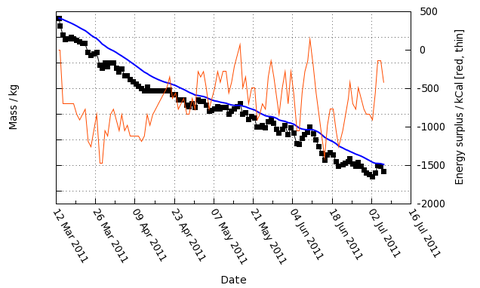 That's my own graph for the last few months, so I've taken the liberty of removing the actual numbers. Suffice to say that each tick on the mass axis corresponds to two kilograms, and I'm rather pleased with progress so far...
You can download Scales of Truth right here. Simply download the file, open it in a text editor, satisfy yourself that it's not going to do anything evil to your computer, then follow the instructions.
September 13, 2010
Trackball Configuration
Option "Buttons" "9"
Option "EmulateWheel" "on"
Option "EmulateWheelButton" "9"
Option "ButtonMapping" "3 8 1 4 5 6 7 2 9"
That worked until the business of HAL for X input configuration came along. Then I put something like this in /etc/hal/fdi/policy/trackball.fdi:
<deviceinfo version="0.2">
<device>
<match key="info.product" string="Logitech USB Trackball">
<merge key="input.x11_driver" type="string">mouse</merge>
<merge key="input.x11_options.Buttons" type="string">5</merge>
<merge key="input.x11_options.EmulateWheel" type="string">true</merge>
<merge key="input.x11_options.EmulateWheelButton" type="string">9</merge>
<merge key="input.x11_options.ZaxisMapping" type="string">4 5</merge>
<merge key="input.x11_options.ButtonMapping" type="string">3 2 1 4 5 6 7 8 9</merge>
<merge key="input.x11_options.MinSpeed" type="string">0.40</merge>
<merge key="input.x11_options.MaxSpeed" type="string">0.60</merge>
<merge key="input.x11_options.AccelFactor" type="string">0.010</merge>
</match>
</device>
</deviceinfo>
That worked, but never quite satisfactorily. In some versions, the trackball would only work properly if plugged in after I'd booted up and logged in. In later versions (notably Fedora 12 and 13) it would never work correctly at all. In Fedora 13, the HAL method was deprecated and replaced with a method via files under /etc/X11/xorg.conf.d/. I added a file called "01-trackball.conf" containing:
Section "InputClass"
Identifier "trackball"
MatchProduct "Logitech USB Trackball"
Option "Buttons" "9"
Option "EmulateWheel" "on"
Option "EmulateWheelButton" "9"
Option "ButtonMapping" "3 8 1 4 5 6 7 2 9"
EndSection
Section "InputClass"
Identifier "trackpad"
MatchProduct "SynPS/2 Synaptics TouchPad"
Option "ButtonMapping" "1 2 3"
EndSection
These lines define the exact button configuration for both the trackball and the trackpad, and the combination of InputClass and MatchProduct means that the rule works even if the trackball isn't present when X starts.
But it still didn't quite work. It seemed that the settings always got overridden by Gnome's central mouse options, left or right handed but not my strange mixture. The main buttons (left and right click) on the trackball had to be the same as the trackpad because Gnome couldn't understand the idea of having the two configured differently.
With a little clear thought, it's probably already obvious what was going wrong, though it was infuriating for a long time. Gnome (specifically gnome-settings-daemon) does indeed override your nicely thought out X config. Fortunately, besides "left handed" and "right handed" modes, it also has an extra mode called "don't screw with my damn setup you piece of ****". It just takes a little more surgery to enable:
$ gconftool-2 -s /apps/gnome_settings_daemon/plugins/mouse/active --type bool false
With Gnome's mouse config stuff safely (and permanently) anaesthetised, you're clear to configure things your way again.
August 22, 2010
Thinkpad DVD Noise
One problem I've been experiencing with my new(ish) Thinkpad T500 is the large amount of noise made by the DVD drive. It's loud enough to be distracting when watching a film - not quite enough to drown it out, but enough to be clearly heard over even the louder parts until your mind starts filtering it out. The tray rattles against the casing, which makes it much worse. I found the noise could be reduced significantly by squashing one or two bits of folded tissue between then tray and the casing above, but that's a nasty solution.
Of course, there's a proper fix for this. Just go into the BIOS config (press the blue ThinkVantage button when the BIOS boot screen shows up, hold it down until the message goes away, then follow the instructions), and find the options for the CD drive, and set it to "Silent". Problem solved - the drive becomes almost inaudible, and it doesn't seem to have any adverse effect on the playback of DVDs.
June 30, 2010
iAudio X5 Tagging
It does, however, have a particular weirdness when handling Ogg/Vorbis files. Its tag parser is extremely basic, and apparently just skips one character (the equals sign) after finding the letters "ARTIST" in the tags. But most recent ripping software adds an extra field, called ARTISTSORT. The X5 often finds that instead of ARTIST, and thinks the name of the artist is something like "ORT=Haza, Ofra" instead of "Ofra Haza".
So, I wrote a little script to remove the ARTISTSORT tags altogether. It's a cheap solution - it'd probably be better just to move that tag to the end (possibly the start, I didn't really test) of the tags field, but this field isn't used for sorting on the X5 anyway.
Here's the script ("
ogg-retag"). It's really simple:#!/bin/sh
if [ -e ogg.tags ]; then
echo "ogg.tags file exists. Please remove it first."
exit 1
fi
for FILENAME in "$@"; do
echo "Processing "$FILENAME
# Dump tags to file, removing ARTISTSORT tag
vorbiscomment -l "$FILENAME" | grep -v "ARTISTSORT=" \
> ogg.tags

        # Write tags back
        vorbiscomment -w -c ogg.tags "$FILENAME"

done

rm -f ogg.tags
To run, simply "cd" into the folder containing the problematic Ogg/Vorbis files, then run "ogg-retag *.ogg" or similar.
May 24, 2010
Easier Partial "DCommitting"
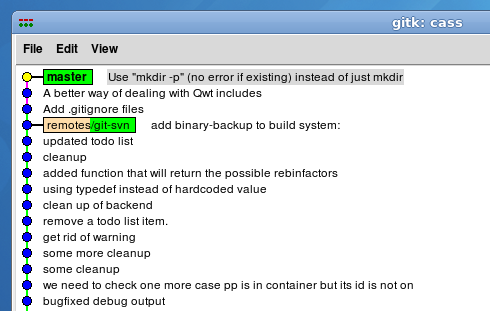
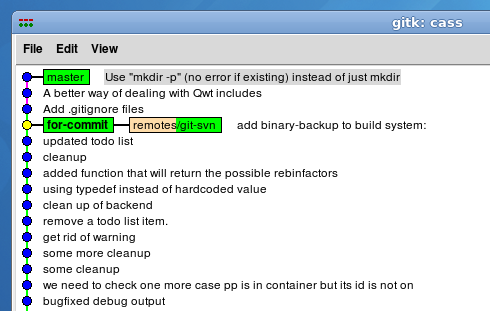 Nothing too exciting has happened, but we're now on the "for-commit" branch which points in a sensible place. I right-click* each commit that's to be committed to Subversion, and cherry-pick them onto the "for-commit" branch: